NetStacksNetStacks

Free for individuals · macOS, Windows and Linux · Telnet, SSH and SFTP

The SSH terminal built for network engineers.

Sessions, credentials, topology maps and change control in one desktop app, with an AI assistant that reads the same terminal you do. Bring your own model: Anthropic, OpenAI, Ollama, or any OpenAI-compatible endpoint.

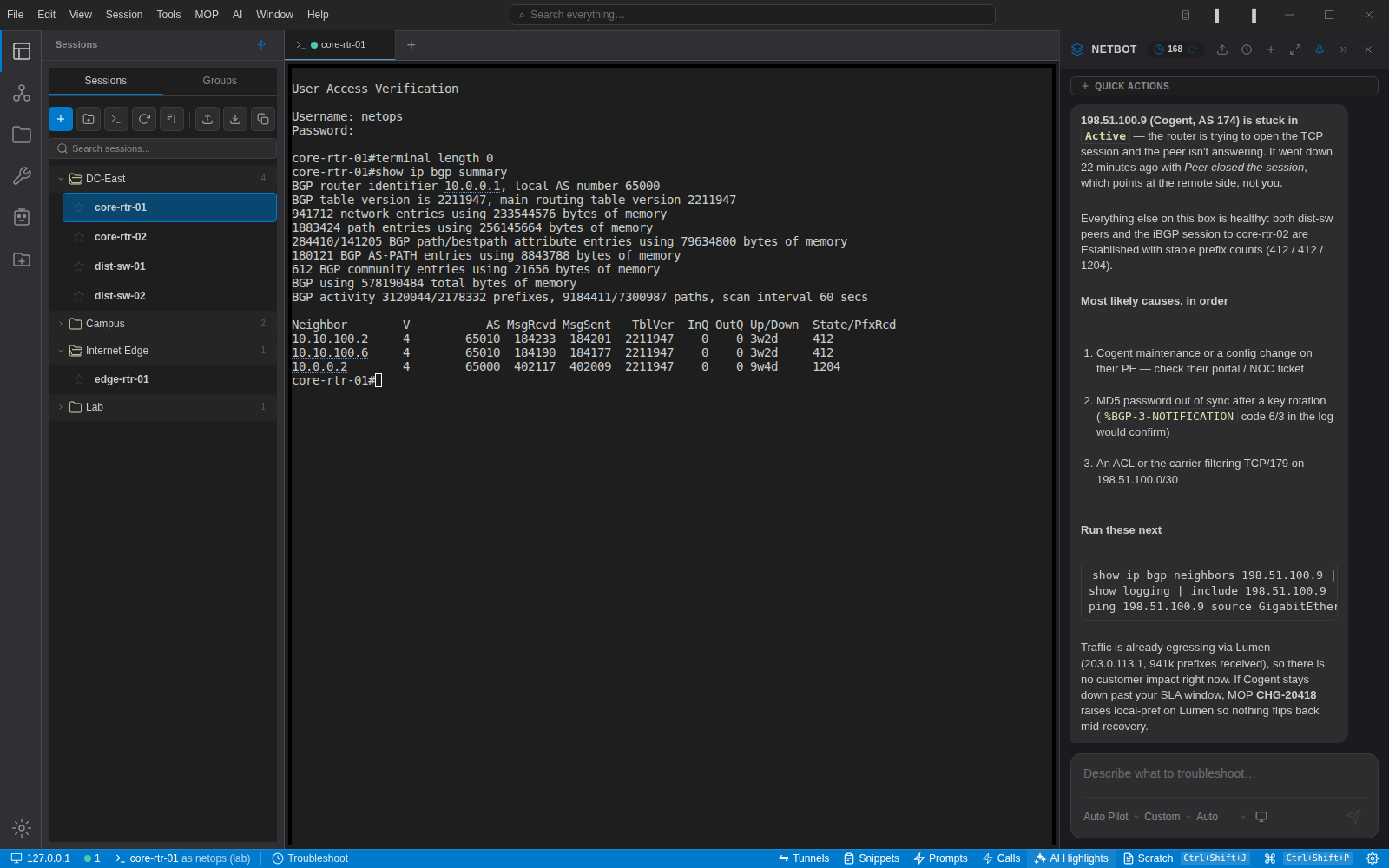
NetStacks with a session open to core-rtr-01 showing 'show ip bgp summary' output, the session library on the left, and the NetBot panel on the right explaining that the Cogent peer is stuck in Active state and listing the commands to run next

Every image on this site is a capture of the application running against a lab network. Nothing is mocked up.

Your model
  • Anthropic Claude
  • OpenAI
  • OpenRouter
  • Ollama (local)
  • LiteLLM
  • Any OpenAI-compatible API
Your CLI
  • Cisco IOS / IOS-XE
  • Cisco IOS-XR
  • Cisco NX-OS
  • Juniper Junos
  • Arista EOS
  • Palo Alto PAN-OS
  • Fortinet FortiOS
  • Linux

Four things you will do in the first ten minutes

Recorded from the app against a lab of Cisco IOS-XE devices. The clips loop; each runs 10 to 25 seconds. Each one links to the full narrated walkthrough on YouTube.

Ask about what is on screenRun show ip bgp summary, ask why a peer is down. NetBot reads the neighbor table and answers with the next commands to run.Watch the full walkthroughOpen as GIF
Review a multi-line paste before it is sentCtrl+V opens the paste dialog for anything longer than a line: fix a VLAN number on the left, see exactly what the device will receive on the right.Watch the full walkthroughOpen as GIF
Topology from your sessionsDevices and links drawn from your session library, in 2D or 3D, with interface labels on every link.Watch the full walkthrough
The device remembers the last incidentConnect to edge-rtr-01 and the card for INC-4790 appears. One click hands the incident to the assistant, which ties it to the peer that is down right now.Watch the full walkthroughOpen as GIF

Built around the way network work actually happens

Connect, look, ask, change, write it down. NetStacks keeps those steps in one window and gives each of them a real tool.

A session library that scales past a few dozen devices

Folders and groups, colour tags, credential profiles, jump hosts and tunnels. Import from SecureCRT or NetBox, connect a whole folder at once, and keep every tab in the same window.

  • SSH, Telnet and SFTP with per-session terminal settings
  • Credential profiles stored in an encrypted local vault; keys never live in session files
  • Multi-send to every open tab, snippets, session recording and logging
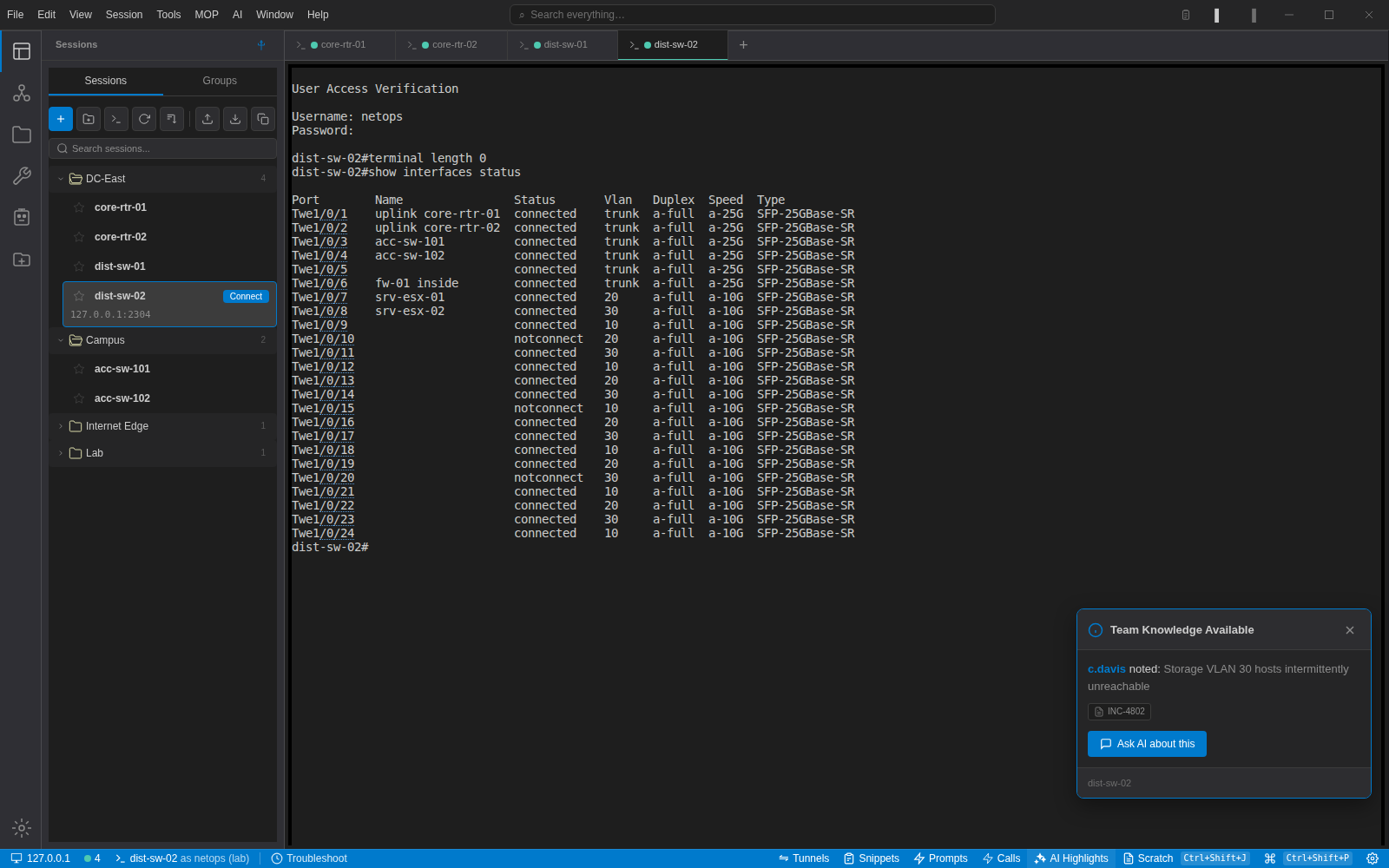
Session management in detail →
Four device tabs open in NetStacks with the DC-East and Campus folders expanded and 'show interfaces status' output on dist-sw-02
Four devices open from the DC-East folder; the active tab shows port status on a distribution switch.

An assistant that reads the terminal with you

NetBot sees the device you are on, its CLI flavour and the output you just got back. Ask a question in the side panel, or select output and right-click for Explain, Fix and Suggest. Answers come back as commands you can run, not paragraphs of theory.

  • Ask, Auto and Auto Pilot modes so you decide how much it does on its own
  • Command autocomplete and next-step suggestions, each with its own on/off switch
  • Every system prompt is visible and editable under Settings → Prompts
How the AI gets its context →
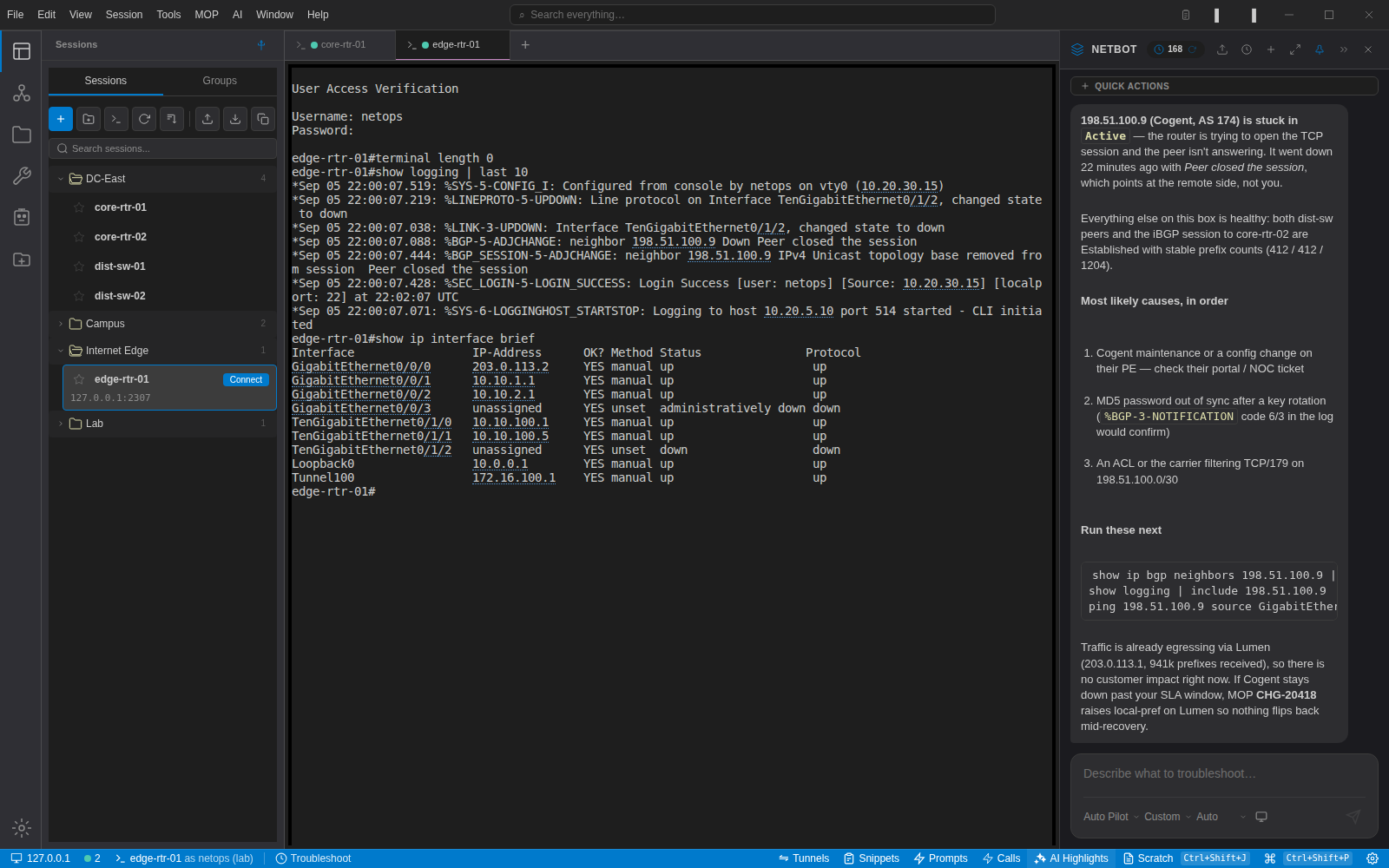
NetStacks with two device tabs open, the edge router's syslog and interface table in the terminal, and the NetBot panel explaining the failed BGP peer
The assistant's answer stays pinned while you move between tabs; here it has correlated a BGP drop with the syslog on the edge router.

Devices remember what happened to them

Attach incidents, root causes, tickets and standing notes to a session. The next engineer to connect sees them the moment the prompt appears, and the same history is fed to the assistant with credentials scrubbed.

  • Shown on connect, one click to ask the AI about it
  • Ticket references stay attached to the device, not to a person's notebook
  • Org-wide with the NetStacks Controller; local in the free edition
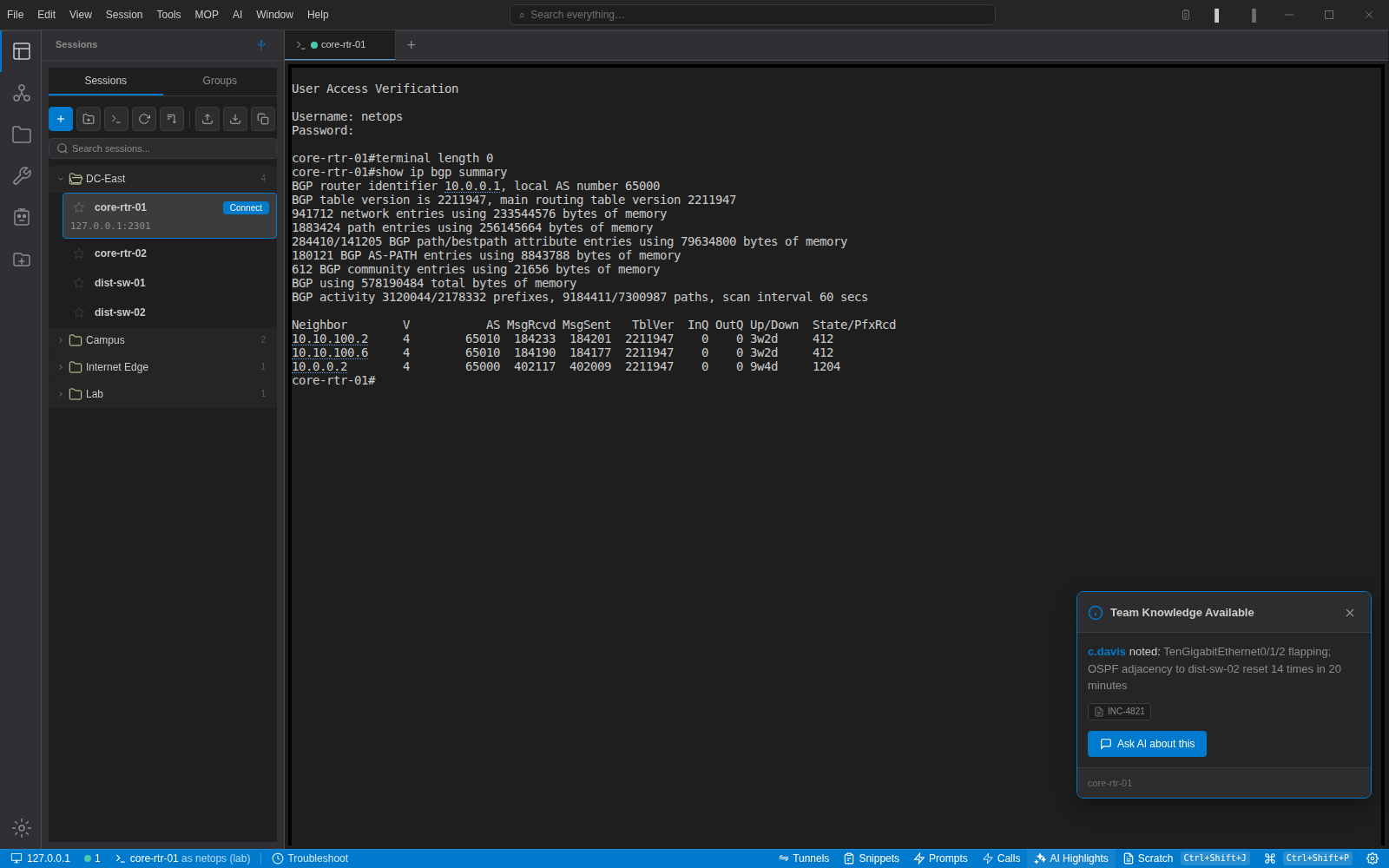
Connecting to core-rtr-01 in NetStacks shows a 'Team Knowledge Available' card citing incident INC-4821 about a flapping TenGigabitEthernet interface
Opening core-rtr-01 surfaces INC-4821, the last incident recorded against this device.

See the network, then click into it

Build a map from the sessions you already have, draw the links with interface names, and switch between 2D and 3D. Enrich it from NetBox, LibreNMS or a Netdisco crawler, poll SNMP for live interface state, and double-click any device to open a terminal to it.

  • Interface labels and link speeds on every edge
  • Live SNMP polling for utilisation and up/down state
  • Annotations, text and shapes for change-window diagrams
Topology and discovery →
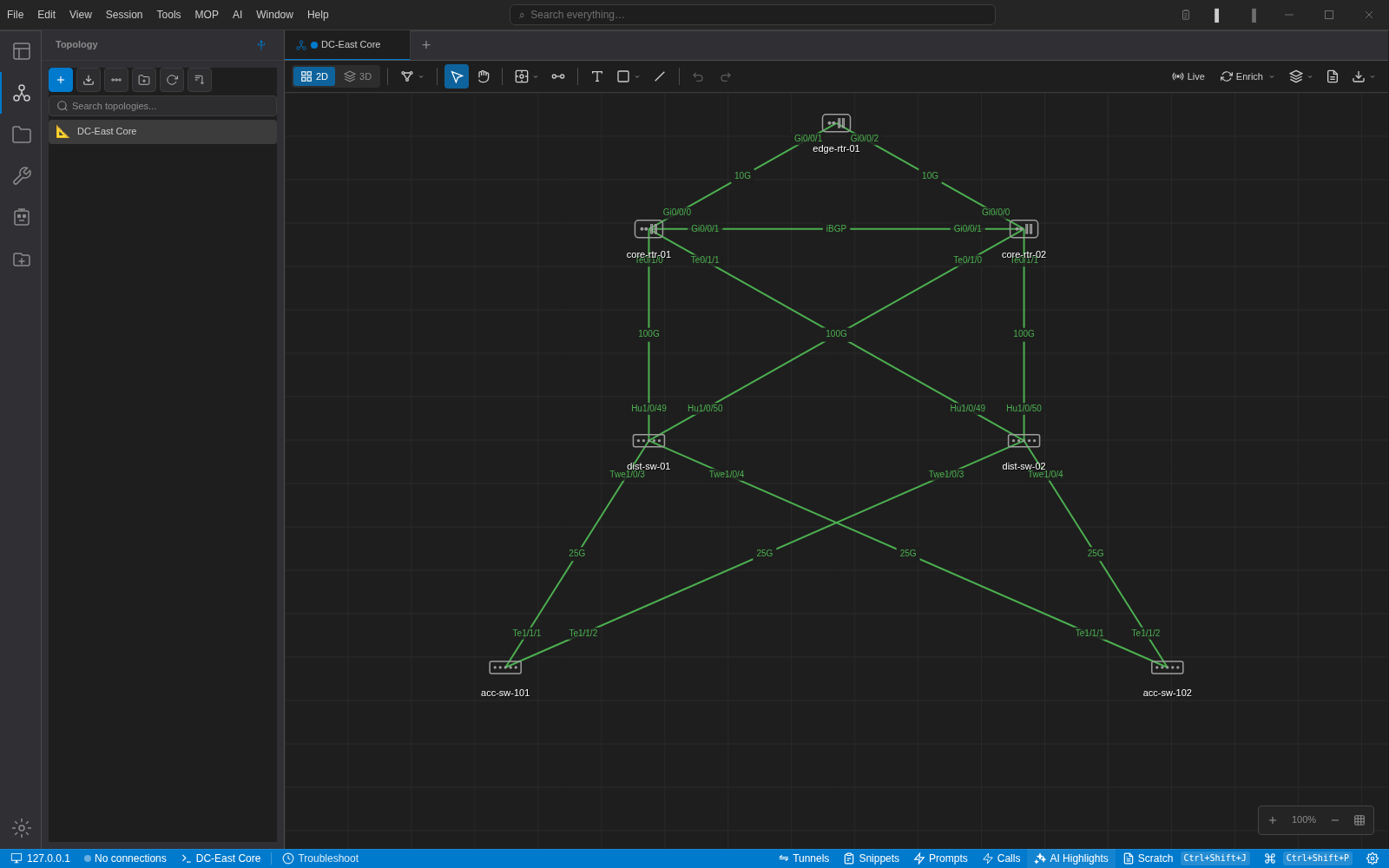
NetStacks 2D topology of a data centre core: an edge router, two core routers, two distribution switches and two access switches joined by labelled 10G, 100G and 25G links
DC-East Core in 2D. Every link carries its interface names and speed.

Paste like you mean it

Multi-line pastes open a review dialog first. The left pane is editable, the right pane shows exactly what the device will receive after the flavour's preset has normalised line endings and stripped comments. Ctrl+Shift+V still sends raw bytes when that is what you want.

  • Presets per CLI flavour: IOS clean paste, Junos set-mode cleanup, and your own
  • Clipboard history with provenance: which device, which session, which document
  • Passwords, secrets and SNMP communities are scrubbed before anything is stored
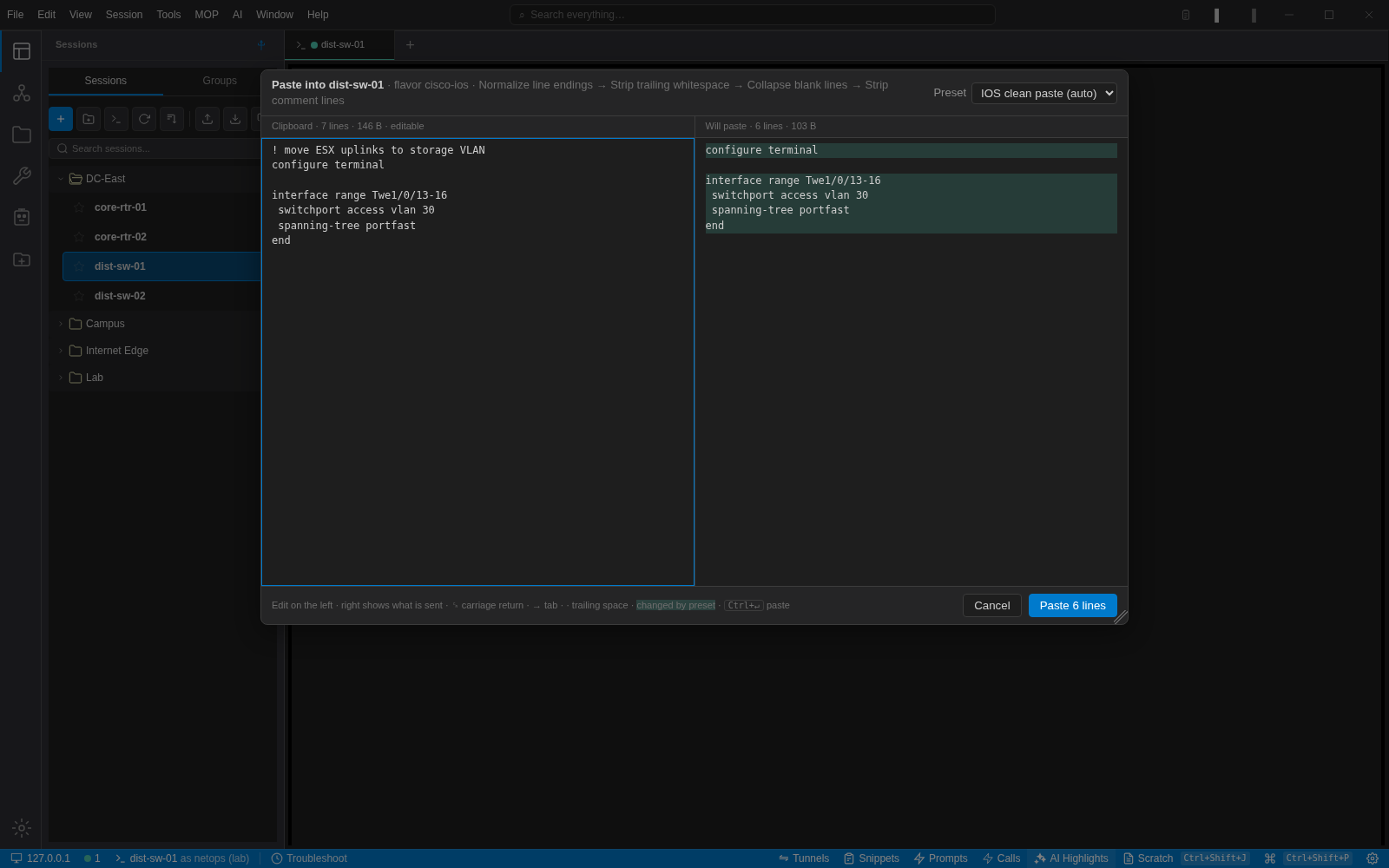
NetStacks paste dialog for dist-sw-01: clipboard text on the left, the six lines that will be pasted on the right after the IOS clean paste preset removed a comment and a blank line
Seven lines on the clipboard, six going to the switch: the comment line and the blank line were dropped by the IOS preset.

MOPs with pre-checks, post-checks and rollback

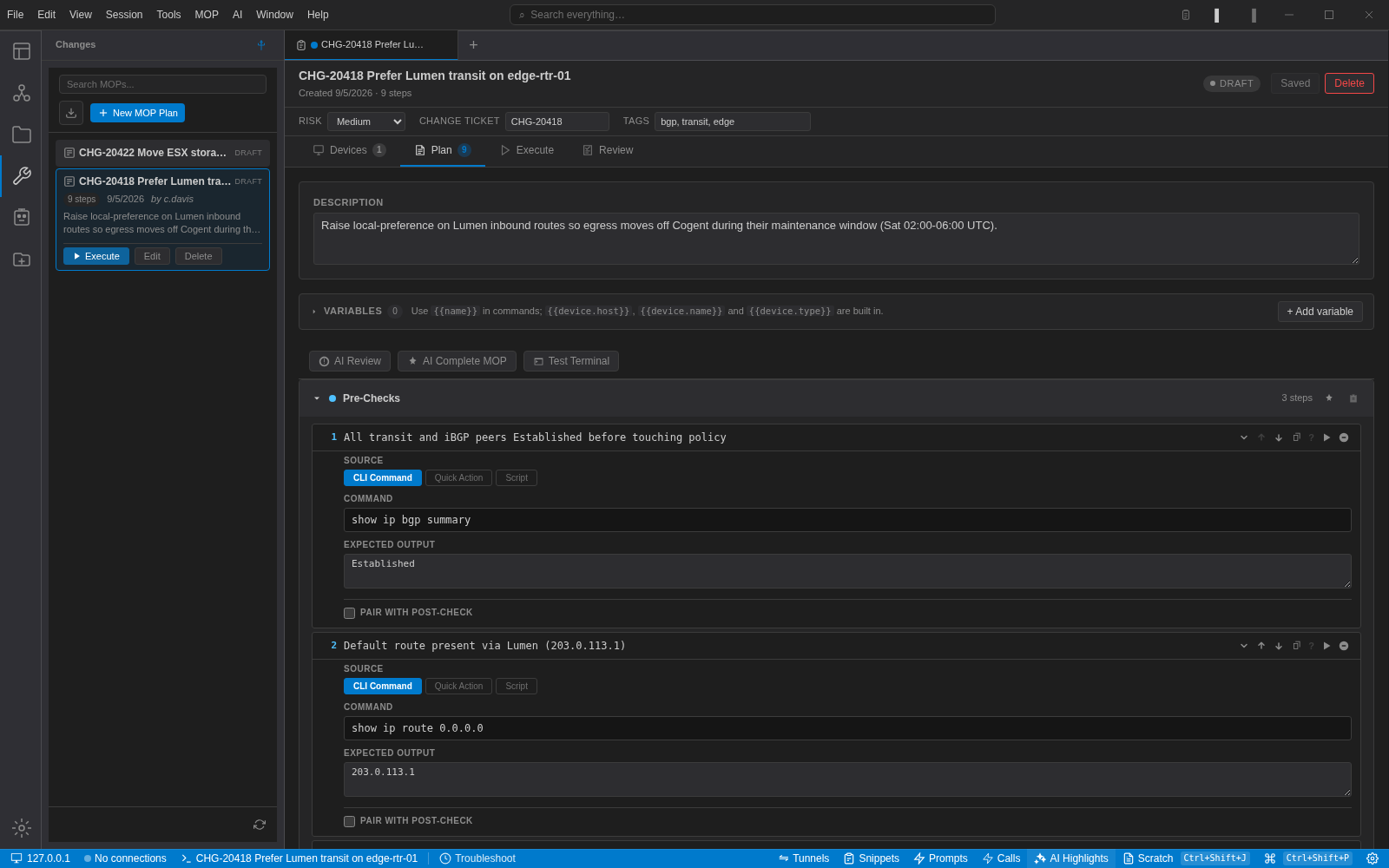
A method of procedure in NetStacks is a typed list of steps, not a Word document. Pre-checks gate the change, each step has expected output, post-checks confirm the result and the rollback is written before anything runs.

  • Execute step by step or per phase, with pause points you choose
  • Steps can call CLI commands, saved scripts or REST quick actions
  • Export and import as .mop.json to review changes in a pull request
Automation and MOPs →
The NetStacks MOP builder for CHG-20418 showing risk, change ticket and tags, the Devices, Plan, Execute and Review tabs, and the first two pre-check steps with their commands and expected output
CHG-20418 in the plan editor: three pre-checks gate two changes, followed by three post-checks and a written rollback.

Runbooks, outputs and write-ups next to the terminal

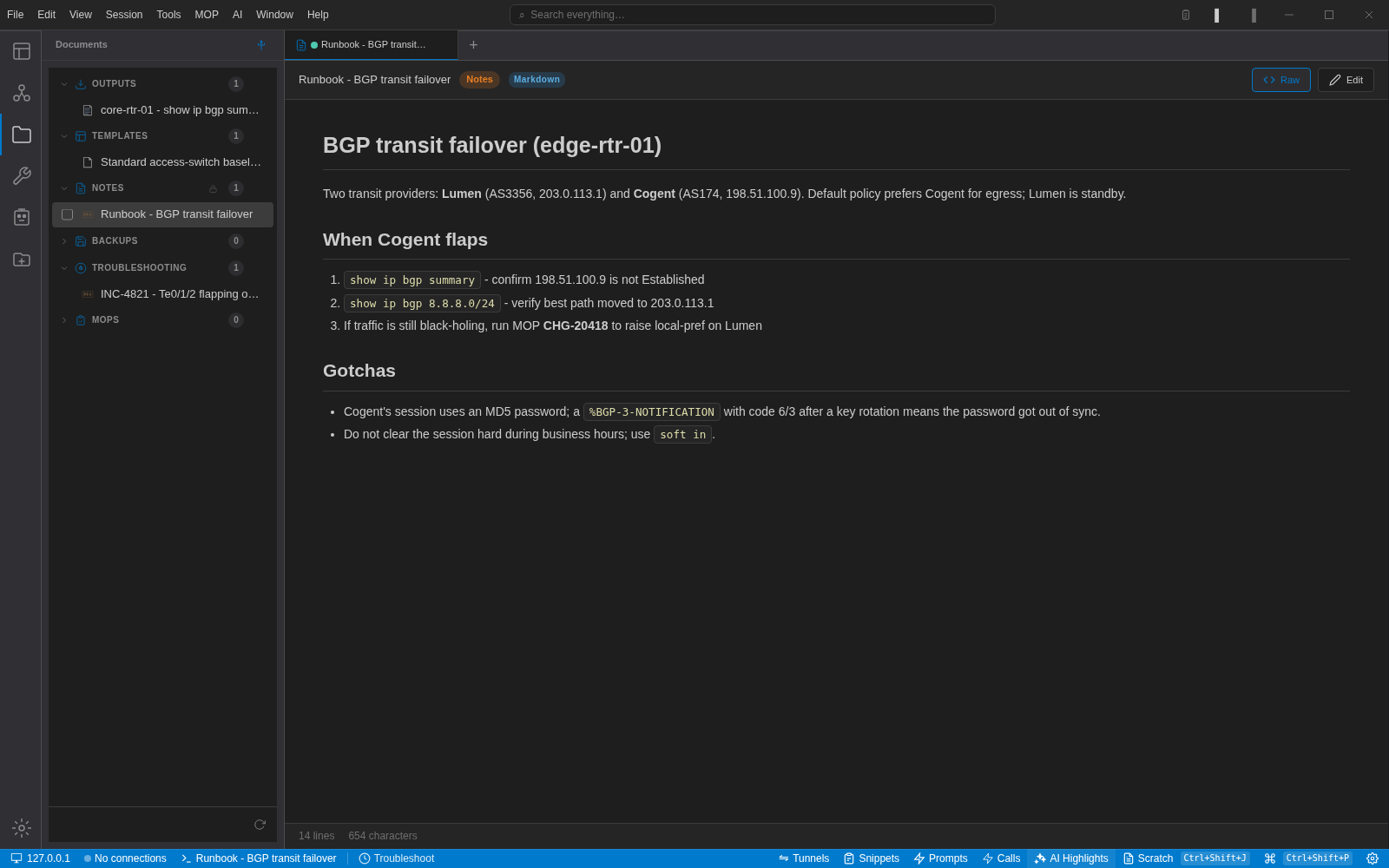
Save command output straight from the context menu, keep Markdown runbooks and incident notes in the app, and turn a troubleshooting session into a write-up with one AI pass. Everything is searchable from the same box as your commands.

  • Outputs, templates, notes, backups, troubleshooting and MOPs as categories
  • Jinja2 templates render against device variables
  • Search everything: sessions, documents, settings and commands
A Markdown runbook titled 'BGP transit failover' rendered inside NetStacks, with the Documents sidebar showing outputs, templates, notes and troubleshooting categories
A failover runbook rendered from Markdown, one click from the device it applies to.

No NetStacks account. No proxy. Your API key, your provider.

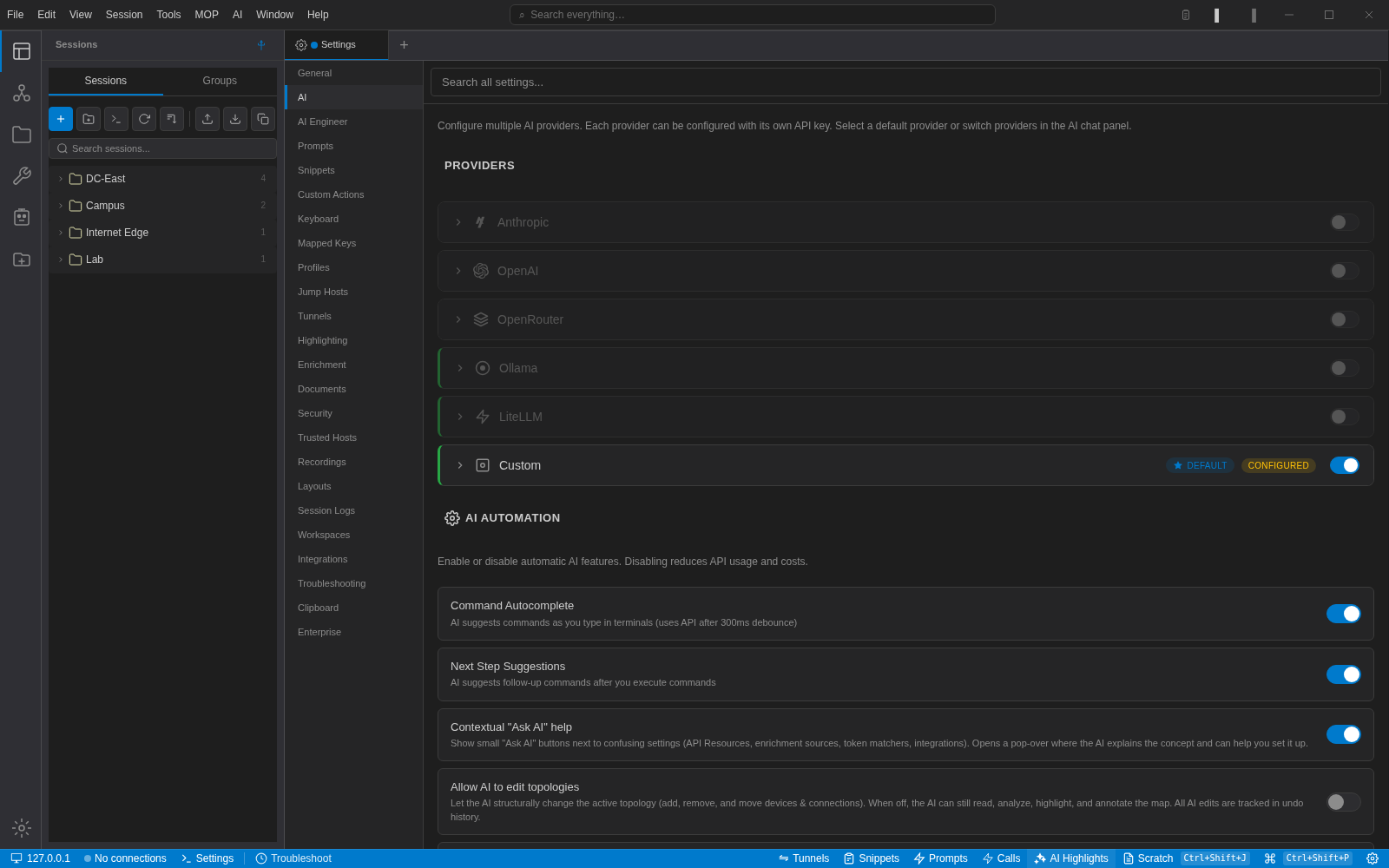
Pick Anthropic, OpenAI, OpenRouter, a local Ollama, LiteLLM or any OpenAI-compatible endpoint. Keys live in the same encrypted vault as your device credentials. Each automatic AI feature has its own switch, and the AI engineer profile lets you set the name, working style and autonomy level you want.

  • Switch providers per conversation from the panel footer
  • Knowledge packs for routing, data centre, security, wireless and vendor CLIs
  • Prompts are editable; the few that are fixed are fixed on purpose and say so
What leaves your machine →
NetStacks AI settings listing Anthropic, OpenAI, OpenRouter, Ollama, LiteLLM and a configured Custom provider, with toggles for command autocomplete and next-step suggestions
Providers on top, automation toggles below. The default here is a custom OpenAI-compatible endpoint.

Compared with the terminal you use today

The session management you already rely on, plus the parts that were never there.

FeatureNetStacksSecureCRT / PuTTY
Terminal
Tabbed, dockable UI with a command palette
Native performance
Session organization
Multi-send mode
Jump hosts
Split panes
AI & Intelligence
AI assistance
Built-in documentation generator
Visual traceroute
Network topology view
NetBox integration
Automation
Config templates & automation
Methods of Procedures (MOPs)
AI-powered NOC agents
Plugin/SDK extensibility
Approval workflows
Enterprise
Controller-proxied SSH (creds server-side)
Browser-based terminal access
SSO / SAML / OIDC
RBAC with granular permissions
Clipboard history with credential scrubbing

Import your existing sessions in one click. Keep your workflows; pick up modern tooling.

Download NetStacks

Free for individuals, no account required. Import your SecureCRT sessions, add one API key, and you are working in a few minutes. Teams that need shared credentials, audit logs and SSO can add the NetStacks Controller later.