
Method of Procedures
Author, review, and execute multi-step network change procedures with phases, risk levels, rollback, control modes, and AI Pilot trust levels in NetStacks.
Video Walkthrough
A short demo of MOPs in NetStacks — defining steps, validations, and rollback.
Overview
A Method of Procedure (MOP) is a structured, multi-step operational plan for making changes to production network infrastructure. MOPs enforce discipline around change management by requiring each procedure to define its steps, expected outputs, rollback commands, and risk level before execution. A MOP plan is versioned and produces a full execution record.
MOPs in NetStacks provide:
- Phased steps — Steps typed as pre-checks, changes, post-checks, rollback, and API actions
- Risk levels — Low, medium, high, or critical classification stored as MOP metadata
- Platform hints — Tag the target device platforms so the AI understands the expected command syntax
- Control modes — Manual, Auto-Run, or AI Pilot, choosing how much of the run is hands-off
- Execution strategies — Sequential device-by-device or parallel-by-phase execution
- Revisions — Each edit bumps the plan revision so you can track the procedure's history
- Portable packages — Export as a
.mop.jsonfile to share a MOP across NetStacks instances
Authoring MOPs, exporting and importing .mop.json packages, AI Suggest, paste-to-steps, mock mode, and running a MOP locally against your own SSH sessions are all available in the free standalone NetStacks terminal. The Controller-hosted shared MOP library, submit-for-review, the multi-approver workflow, and server-side execution against device inventory are Teams/Enterprise features that require the NetStacks Controller.
Scheduled tasks are for routine, repeatable operations (backups, health checks). MOPs are for complex, multi-step changes that need human or AI review at each phase — things like VLAN deployments, BGP maintenance windows, or firmware upgrades where each step must be validated before proceeding.
How It Works
MOP Workspace
The MOP workspace is organized into sub-tabs: Plan (the step editor), Devices (target picker), Execute (the live run view), and Review (results). On the Controller, a History tab lists prior executions of the plan.
Step Types
Every step has a step_type. The valid types are pre_check, change, post_check, rollback, and api_action:
| Step Type | Purpose | Example |
|---|---|---|
pre_check | Capture baseline device state before changes | show ip bgp summary |
change | Execute the operational change | neighbor 10.0.0.1 shutdown |
post_check | Verify the change succeeded by comparing to baseline | show ip bgp summary |
rollback | Undo the change if something goes wrong | no neighbor 10.0.0.1 shutdown |
api_action | Call an external API instead of running a device command | NetBox device lookup, ticket update |
Execution Source
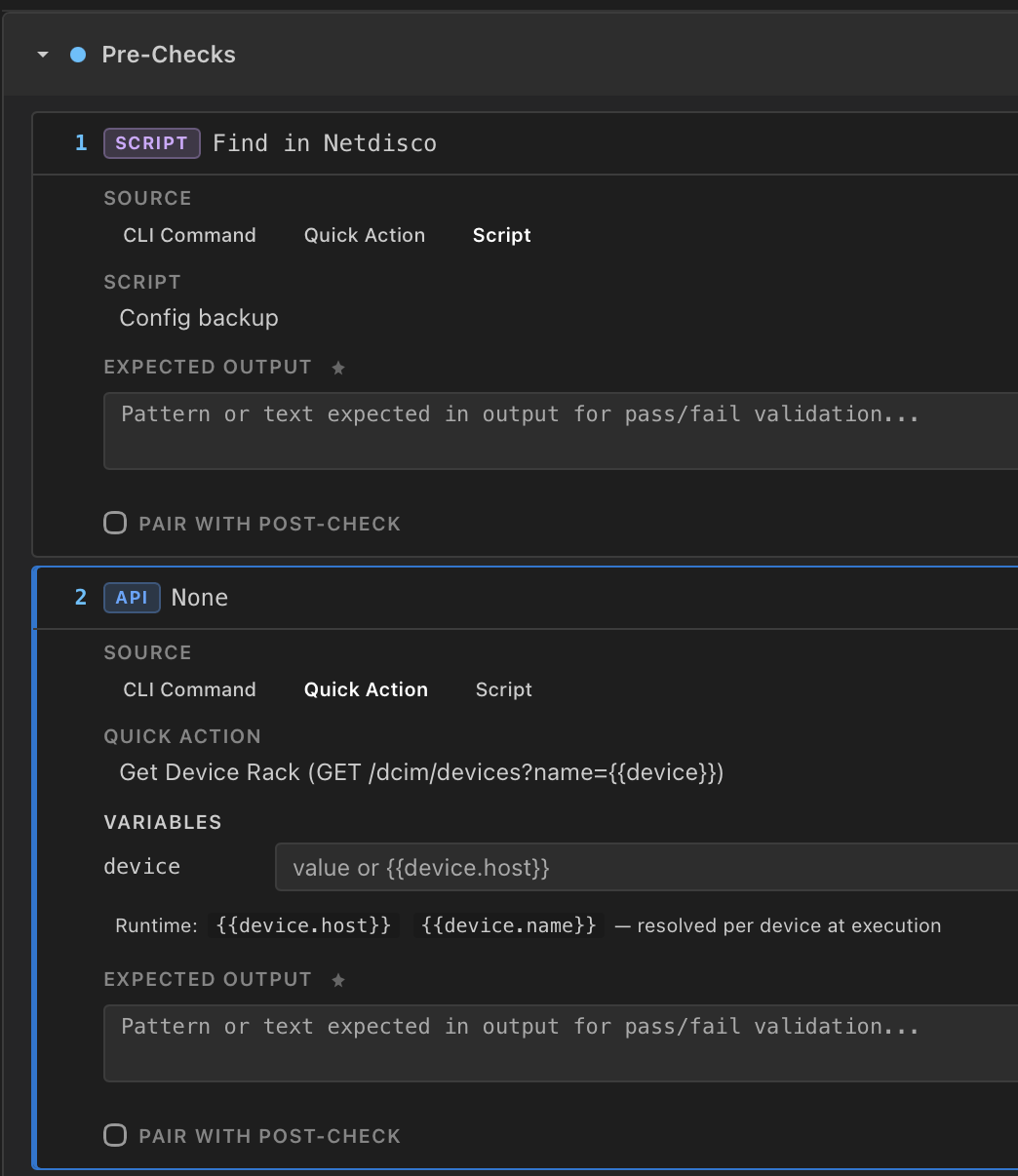
Independently of its type, each step has an execution_source that decides how it runs. This is a separate axis from step_type. The sources are:
cli— the default; sendcommandto the device over SSHquick_action— invoke a saved Quick Call (an API request) with variablesscript— run a saved script with arguments
So an api_action step typically uses the quick_action source, while a change or pre_check step usually uses cli. Steps can also pair with another step (paired_step_id) — for example a post-check mirrored from a pre-check — and capture output as text or json.
Execution Engine
The engine runs steps in order. Depending on the control mode it can pause at phase boundaries for review. CLI steps send commands to target devices via SSH and capture the output for comparison against the step's expected output. Each step also supports mock mode, which returns a canned output instead of touching the device.
Revisions
A MOP plan carries a revision number that increments as you edit it. The exported package records the current revision under metadata.lineage.revision. On the Controller, prior executions of the plan are listed in the History tab so you can see how a procedure has been run over time.
Use the AI Suggest button on a phase section in the Plan editor to generate steps for that phase. The AI analyzes the surrounding commands and proposes appropriate pre-checks, post-checks, or rollback steps with descriptions.
Control Modes & AI Pilot
Control Modes
When you start an execution you pick a control mode. The three modes are manual, auto_run, and ai_pilot:
| Mode | Behavior |
|---|---|
| Manual | The operator runs and approves each step. Nothing executes until you click run on a pending step. |
| Auto-Run | Steps run automatically. The On Failure setting and the per-phase pause gates govern where the run stops. |
| AI Pilot | The AI drives the run, gated by the selected Trust Level (see below). |
The default control mode is manual. For Auto-Run and AI Pilot you also choose an On Failure behavior — one of pause, skip, or abort (default pause). There is no automatic-rollback failure mode; rollback steps are run separately (see Troubleshooting).
AI Pilot Trust Levels
In AI Pilot mode the UI exposes a Trust Level with four settings (L1–L4), from most supervised to fully autonomous:
- L1 — Observer: the AI provides commentary only; you run the steps
- L2 — Advisor: the AI suggests actions, you approve
- L3 — Co-Pilot: the AI runs steps and pauses at phase boundaries
- L4 — Autopilot: the AI runs the entire MOP after plan approval
L4 Autopilot only runs once the plan has been approved. For first-time or high-risk procedures, start at L1 (Observer) or L2 (Advisor) and increase the trust level as you gain confidence.
Pause Gates
For Auto-Run and AI Pilot you can also toggle pause gates between phases: pause_after_pre_checks, pause_after_changes, and pause_after_post_checks. These let the engine stop for review at phase boundaries even when steps otherwise run automatically.
Creating MOPs
Follow these steps to author a MOP in the NetStacks workspace.
Step 1: Open the MOP workspace
Open the MOP workspace and start a new plan. The Plan tab is the step editor; the Devices tab is where you pick targets.
Step 2: Set name and description
Enter a descriptive name (e.g., "VLAN 100 Deployment - DC1 Access Switches") and a description that explains the purpose and scope of the change.
Step 3: Set the risk level
Choose the risk level. This is stored as MOP metadata and, on the Controller, drives the review/approval workflow:
| Risk Level | Description | Typical Use |
|---|---|---|
| Low | Read-only or non-impacting changes | Show commands, health checks, config verification |
| Medium | Standard changes with known rollback procedures | VLAN additions, ACL updates, interface descriptions |
| High | Changes that could affect service availability | BGP peer modifications, OSPF area changes, trunk reconfiguration |
| Critical | Changes with potential for widespread outage | Core router reload, spanning-tree root changes, firmware upgrades |
Step 4: Add steps
Add steps to each phase section in the Plan editor. Each step needs a command and can include a description and an expected output pattern. To bulk-add, open the paste box on a phase section and paste commands one per line, then use AI Suggest to parse them into steps with descriptions. The paste/parse action is per-phase — each section has its own box.
Step 5: Set platform hints
Tag the target platform(s) for the MOP (e.g., cisco-ios, cisco-nxos, juniper-junos, arista-eos). Platform hints help the AI understand the expected command syntax and output format and are saved in the MOP metadata.
Step 6: Pick devices
On the Devices tab, select the targets. In the standalone terminal these are your active SSH sessions; on the Controller they are devices from inventory paired with a vault credential.
Step 7: Configure the run
On the Execute tab choose the execution strategy (Sequential or Parallel), the control mode (Manual / Auto-Run / AI Pilot), and — in AI Pilot — the Trust Level and On Failure behavior. Sequential is safer for changes where you want to confirm success on one device before proceeding.
On the Controller, MOPs are submitted for review and may require approval before execution. See the Approvals page to configure approval workflows for your organization.
Step 8: Start execution
Click Start Execution. If the plan is approval-gated and not yet approved, the button is replaced by an "Awaiting Approval" label until a reviewer approves it.
Code Examples
VLAN deployment MOP package
A complete .mop.json package for deploying VLAN 100 (Engineering) to access-layer switches in DC1. The export format is netstacks-mop version 2.0. This example shows all four phases with Cisco IOS commands:
{
  "format": "netstacks-mop",
  "version": "2.0",
  "source": "NetStacks Controller",
  "mop": {
    "name": "Deploy VLAN 100 - Engineering",
    "description": "Add VLAN 100 to DC1 access switches and assign to user ports",
    "author": "netops-team",
    "steps": [
      {
        "order": 1,
        "step_type": "pre_check",
        "execution_source": "cli",
        "command": "show vlan brief",
        "description": "Verify current VLAN database before changes",
        "expected_output": "VLAN 100 should NOT be present"
      },
      {
        "order": 2,
        "step_type": "pre_check",
        "execution_source": "cli",
        "command": "show interfaces trunk",
        "description": "Capture trunk state before changes"
      },
      {
        "order": 3,
        "step_type": "change",
        "execution_source": "cli",
        "command": "conf t\nvlan 100\n name ENGINEERING\nexit",
        "description": "Create VLAN 100 with name ENGINEERING"
      },
      {
        "order": 4,
        "step_type": "change",
        "execution_source": "cli",
        "command": "conf t\ninterface range Gi1/0/1-24\n switchport access vlan 100\nexit",
        "description": "Assign user-facing ports to VLAN 100"
      },
      {
        "order": 5,
        "step_type": "post_check",
        "execution_source": "cli",
        "command": "show vlan brief | include 100",
        "description": "Verify VLAN 100 exists",
        "expected_output": "100\s+ENGINEERING"
      },
      {
        "order": 6,
        "step_type": "post_check",
        "execution_source": "cli",
        "command": "show interfaces Gi1/0/1 switchport | include Access Mode VLAN",
        "description": "Verify port assignment",
        "expected_output": "100"
      },
      {
        "order": 7,
        "step_type": "rollback",
        "execution_source": "cli",
        "command": "conf t\ninterface range Gi1/0/1-24\n no switchport access vlan 100\nexit\nno vlan 100",
        "description": "Remove VLAN 100 and revert port assignments"
      }
    ]
  },
  "metadata": {
    "tags": ["vlan", "access-layer", "dc1"],
    "risk_level": "medium",
    "platform_hints": ["cisco-ios"],
    "estimated_duration_minutes": 15,
    "change_ticket": "CHG-2847",
    "lineage": { "revision": 1 }
  }
}An api_action step calls an external API instead of running a device command. It uses the quick_action execution source and references a saved Quick Call. On import, packages from older v1.x exports that used a literal api_action step type are converted to a change step with the quick_action source.
BGP maintenance window MOP
Gracefully shut down a BGP peer for maintenance on a core router, with pre/post verification and rollback:
Pre-Check Phase:
  Step 1: show ip bgp summary
          Verify peer 10.0.0.1 is Established with expected prefix count

  Step 2: show ip bgp neighbors 10.0.0.1 | include BGP state
          Confirm state is "Established"

  Step 3: show ip route summary
          Capture route count baseline

Change Phase:
  Step 4: conf t
          router bgp 65001
           neighbor 10.0.0.1 shutdown
          exit

Post-Check Phase:
  Step 5: show ip bgp summary
          Verify peer 10.0.0.1 shows "Idle (Admin)"

  Step 6: show ip route summary
          Compare route count to pre-check baseline

Rollback Phase:
  Step 7: conf t
          router bgp 65001
           no neighbor 10.0.0.1 shutdown
          exit

  Step 8: show ip bgp neighbors 10.0.0.1 | include BGP state
          Verify peer returns to "Established" within 60 seconds
Execution configuration
When you launch a MOP execution, these runtime options are set. The values below are also the engine defaults except where you override them:
{
  "execution_strategy": "sequential",
  "control_mode": "ai_pilot",
  "ai_autonomy_level": 3,
  "pause_after_pre_checks": true,
  "pause_after_changes": true,
  "pause_after_post_checks": true,
  "on_failure": "pause"
}
Valid values: execution_strategy is sequential or parallel_by_phase; control_mode is manual, auto_run, or ai_pilot; ai_autonomy_level (the Trust Level) is 1–4 and applies only to ai_pilot; and on_failure is pause, skip, or abort. The defaults are sequential, manual, pause, and all three pause gates enabled.
Enable mock mode on individual steps to simulate execution without sending commands to devices. A mocked step returns its configured mock output, letting you test your MOP flow and step ordering before running against production equipment.
Questions & Answers
- Q: What is a Method of Procedure (MOP)?
- A: A MOP is a structured, multi-step plan for making changes to network infrastructure. It defines pre-checks (baseline capture), change commands, post-checks (verification), and rollback procedures. MOPs enforce change management discipline by requiring each step to be defined and, on the Controller, reviewed and approved before execution on production devices.
- Q: Do I need Enterprise to use MOPs?
- A: No. Authoring MOPs, exporting and importing
.mop.jsonpackages, AI Suggest, mock mode, and running a MOP locally against your own SSH sessions are available in the free standalone NetStacks terminal. The Controller-hosted shared MOP library, submit-for-review, the multi-approver workflow, and server-side execution against device inventory are Teams/Enterprise features. - Q: What are the control modes?
- A: Three modes: Manual (the operator runs and approves each step), Auto-Run (steps run automatically, with On Failure and the per-phase pause gates governing stops), and AI Pilot (the AI drives the run, gated by the Trust Level). The default is Manual.
- Q: What are AI Pilot Trust Levels?
- A: In AI Pilot mode the Trust Level has four settings. L1 Observer provides commentary only. L2 Advisor suggests actions you approve. L3 Co-Pilot runs steps and pauses at phase boundaries. L4 Autopilot runs the entire MOP after plan approval. Start low for new or high-risk procedures and raise the level as you gain confidence.
- Q: What are the risk levels and what do they mean?
- A: NetStacks supports four risk levels: Low (read-only or non-impacting), Medium (standard changes with known rollback), High (changes that could affect availability), and Critical (potential for widespread outage). Risk level is MOP metadata and, on the Controller, feeds the review/approval workflow.
- Q: Can a MOP be rolled back if a step fails?
- A: Yes, but rollback is not automatic. Author your
rollbacksteps so the change can be undone. When a step fails, the engine follows theon_failuresetting —pause(stop and wait),skip(continue to the next step), orabort(end the run). You then run the rollback steps yourself, or on the Controller use the per-device rollback action. All actions are recorded. - Q: What step types and execution sources are there?
- A: Step types are
pre_check,change,post_check,rollback, andapi_action. Separately, each step has an execution source —cli(send a command over SSH),quick_action(call a saved Quick Call), orscript(run a saved script). Type and source are independent: anapi_actionstep typically uses thequick_actionsource. - Q: How do platform hints work?
- A: Platform hints are tags like
cisco-ios,cisco-nxos,juniper-junos, orarista-eosstored in the MOP metadata. They tell the AI what command syntax and output format to expect so it can generate better pre-check and rollback suggestions, and they let MOPs be filtered by platform. - Q: What execution strategies are available?
- A: Two strategies. Sequential runs the MOP on one device at a time so you can verify each device before moving on. Parallel by Phase runs each phase across all devices at once — all pre-checks, then all changes, and so on. Sequential is recommended for high-risk changes.
- Q: How does MOP versioning work?
- A: A MOP plan carries a
revisionnumber that increments as you edit it; the exported package records it undermetadata.lineage.revision. On the Controller, the History tab lists prior executions of the plan.
Troubleshooting
MOP step failing unexpectedly
Check the expected output pattern defined for the step. Expected output is matched against device output — if the pattern is too strict it may not match slight variations (extra whitespace, different interface naming). Review the actual device output in the execution view and adjust the pattern. Also confirm the device was in the expected state by checking the pre-check results.
MOP stuck awaiting approval
On the Controller, verify that the configured approvers have been notified and can review the MOP. Check the Approvals configuration so the approval threshold is achievable (e.g., if you require three approvers but only two are configured, the MOP can never be approved). The Execute tab shows an "Awaiting Approval" label while a plan is approval-gated.
Rollback not executing
Rollback is never triggered automatically by a failure. The on_failure behavior is only pause, skip, or abort — there is no rollback failure mode. To undo a change, run the rollback steps yourself; on the Controller you can also use the per-device rollback action (POST /api/mop-executions/{exec}/devices/{device}/rollback). Note that some failures may leave a device in a state where the rollback commands also fail — always have console access for critical changes.
Device override not applied
Device overrides replace the default step list for a specific device during execution. Verify the override is configured for the correct device. During execution, the wizard shows which steps will run on each device — check this preview to confirm the override is applied.
For MOPs with critical risk level, always have out-of-band console access to target devices. If an SSH session drops during execution, you need an alternate path to recover the device.
Related Features
Explore related change management and automation features:
- MOP Approvals — Configure multi-approver workflows and approval thresholds for MOPs
- Scheduled Tasks — Automate routine operations like backups and health checks on a cron schedule
- Task Monitoring — Track MOP execution progress, step outputs, and device status in real time
- Quick Calls — Saved API calls used by
api_action/quick_actionsteps - NOC Agents — AI agents that can supervise MOP execution and provide step-by-step analysis
- Config Snapshots — Capture and compare device configurations before and after MOP execution