
API Overview
EnterpriseThe NetStacks Controller REST API: base URL, authentication, the built-in Swagger UI, conventions, permissions, and a map of the resource groups.
Overview
The NetStacks Controller exposes a JSON REST API. It is the same API the Admin Console and the NetStacks Terminal (in enterprise mode) use, so anything you can do in the UI is backed by an endpoint you can call from your own scripts and tools.
The API is part of the Controller only. A standalone NetStacks Terminal does not expose this API.
The API Reference section covers:
- Authentication: logging in, tokens, and sessions
- Devices: inventory, sites, imports
- Connection profiles: credentials and secrets
- Templates: config templates and platforms
- Stacks and deployments: stacks, instances, and deployments
- Config backups: config pulls, versions, diffs, and snapshots
- MOPs: MOP review and executions
- Scheduled tasks and jobs
- Administration: users, roles, organizations, audit log, settings
- Errors: error format and status codes
Base URL and TLS
All endpoints live under /api on the same host and port as the Admin Console. With the standard install that is:
https://<controller-host>:3000/apiThe API has no version prefix (there is no /v1). It always uses HTTPS.
The Controller generates its own certificate authority (CA) and signs its server certificate with it. To make curl and other clients trust it, download the CA certificate once (no login needed) and pass it to your client:
# Download the Controller's CA certificate (public endpoint)
curl -k -o netstacks-ca.pem https://controller.example.com:3000/api/tls/ca-certificate

# Use it for later calls
curl --cacert netstacks-ca.pem https://controller.example.com:3000/api/healthFor a quick test you can skip certificate checks with curl -k. Don't do this in production scripts.
Interactive reference (Swagger UI)
Every Controller serves an OpenAPI description of its API:
| What | Where |
|---|---|
| Swagger UI (browse and try endpoints) | https://<controller-host>:3000/swagger-ui |
| OpenAPI JSON spec (for code generators, Postman, and similar tools) | https://<controller-host>:3000/api-docs/openapi.json |
| Inside the Admin Console | The API Documentation page at /api-docs, or Help → API Docs in the header |
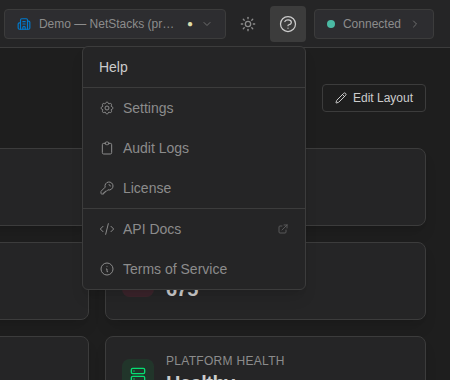
In the Admin Console, open the Help menu (the question-mark icon in the header) and choose API Docs to open the Swagger UI.
The Swagger UI groups endpoints by tag. To try calls from the browser, click Authorize and paste an access token from a login. Swagger UI adds the Bearer prefix for you.
The OpenAPI spec covers the core groups (auth, users, roles, devices, audit, tasks, MOPs, AI, and others). Some groups are not in the spec yet, including config automation (templates, stacks, instances, deployments), config snapshots, scripts, sites, and tunnels. The pages in this section document those endpoints from the Controller's routing code. When a plugin is installed, its own endpoints are added to the spec under /api/plugins/<name>/.
Quick start
Log in, save the access token, and call an endpoint:
NS=https://controller.example.com:3000

# 1. Log in (local NetStacks user)
TOKEN=$(curl -s --cacert netstacks-ca.pem -X POST "$NS/api/auth/login" \
  -H "Content-Type: application/json" \
  -d '{"username":"automation","password":"<password>"}' | jq -r .access_token)

# 2. Call the API with the token
curl -s --cacert netstacks-ca.pem "$NS/api/devices?limit=10" \
  -H "Authorization: Bearer $TOKEN" | jq '.devices[] | {name, host}'
There are no long-lived API keys. Scripts log in as a NetStacks user and use the refresh token to keep going. See Authentication.
Conventions
- JSON in, JSON out. Send
Content-Type: application/jsonon requests with a body. The CSV device import is the one text upload. - IDs are UUIDs. Timestamps are ISO 8601 / RFC 3339 in UTC (for example
2026-10-12T14:03:22Z). - Pagination. Most list endpoints take
limitandoffsetquery parameters. The defaultlimitis 50, and most lists cap it at 100. The audit log usespageandlimitinstead. - Create calls usually return
201 Createdwith the new object. Delete calls usually return204 No Content. - Organization scope. Every request works inside the organization carried in your access token. You can't see or change another organization's devices, templates, and so on. Platform administrators can switch organizations (see Switching organization).
- Partial updates.
PUTendpoints on devices, templates, stacks, users, and profiles only change the fields you send. Leave a field out to keep its current value. - Rate limits apply only to the
/api/auth/*endpoints. See Login rate limits.
Permissions
Endpoints check the permissions granted by the caller's roles (see Roles and permissions). The API checks these permission keys:
| Permission | Grants access to |
|---|---|
devices.access | Day-to-day operations: devices, sites, config backups, templates, stacks, deployments, MOPs, scheduled tasks, topologies, AI agents, knowledge base, tunnels, and search |
credentials.manage | Connection profiles and their secrets |
users.manage | Users, roles, live sessions, the SSH CA, and LLM providers |
system.manage | Changing settings, license activation, plugins, jumpboxes, system backup and restore |
platform.admin | Organizations and switching between them |
The * permission (the built-in admin role) grants everything inside its organization except platform.admin. A call without the needed permission returns 403 with {"error":"Insufficient permissions"}.
The endpoint tables on each page show the permission each endpoint checks.
Resource groups
Main base paths, all under /api:
| Base path | What it covers | Page |
|---|---|---|
/api/auth | Login, refresh, logout, current user, sessions | Authentication |
/api/devices, /api/sites | Device inventory, imports, NetBox sources, sites | Devices |
/api/profiles | Connection profiles, secrets, access grants | Connection profiles |
/api/config/templates, /api/config/platforms | Config templates and automation platforms | Templates |
/api/config/stacks, /instances, /deployments | Stacks, saved instances, deployments, rollback | Stacks and deployments |
/api/config/devices, /api/devices/snapshots | Config pulls, stored versions, diffs, snapshots | Config backups |
/api/mops, /api/mop-executions | MOP review and executions | MOPs |
/api/tasks, /api/activity, /api/config/jobs | Scheduled tasks, job history | Scheduled tasks and jobs |
/api/admin/* | Users, roles, organizations, audit log, settings, license, health | Administration |
/api/topologies, /api/knowledge, /api/agents, /api/mcp, /api/api-resources, /api/quick-actions | Topologies, knowledge base, AI agents, MCP servers, API resources, quick actions | See the Swagger UI |
/api/plugins/<name>/* | Endpoints added by installed plugins | Plugins |
Health endpoints
These endpoints need no token and are handy for load balancers and monitoring:
| Endpoint | Returns |
|---|---|
GET /api/health (also /health) | {"status":"ok","version":"…"} while the API process is up |
GET /api/ready (also /ready) | status (ready or not ready) plus the database and valkey state |
GET /api/admin/health (token required) returns a per-component view: the database (with latency), the task scheduler, the credential vault, Valkey, and the overall uptime. It backs the Platform Health page.