Upgrades & Backups
EnterpriseUpgrade the NetStacks Controller with upgrade.sh or Docker Compose, roll back, and back up or restore the database from the admin console.
Overview
Controller upgrades are image upgrades: pull the new images and recreate the containers. Database migrations run automatically when the API starts, and your data volumes are kept. The Controller version is shown in Administration → Deployment Info, Platform Health and the dashboard's System Health panel.
Run all commands below from the deploy directory that contains your .env and docker-compose.yml.
Upgrade with upgrade.sh
upgrade.sh wraps the manual steps and adds a database backup and a health check:
./upgrade.sh 0.0.20     # upgrade to a specific version
./upgrade.sh            # prompts for the version
It performs these steps:
- Pulls the target
controller,admin-uiandcrawlerimages. - Dumps the bundled database to
backups/netstacks_v<current>_<timestamp>.sql.gz(the five most recent dumps are kept). - Sets
NETSTACKS_VERSIONin.env. - Runs
docker compose up -d(only containers whose image changed are recreated). - Polls
/healthfor up to two minutes and prints rollback steps if the API doesn't come up.
upgrade.sh works with the single-instance docker-compose.yml. For an HA deployment, upgrade manually with the HA compose file (see High Availability).
Upgrade Manually
- Download a backup first (see below).
- Edit
.envand setNETSTACKS_VERSIONto the new version. If you uselatest, leave it as is —pullfetches the newest release. - Pull and recreate:
docker compose pull docker compose up -d - Confirm the new version in Administration → Deployment Info, or with
curl -k https://localhost:3000/health.
The internal TLS CA lives in the netstacks_data volume, so browsers and Terminal clients that already trust it don't need to re-trust anything after an upgrade.
Roll Back
- Set the previous version in
.env(NETSTACKS_VERSION=<old>). - Restore the pre-upgrade dump if the new version already migrated the database:
gunzip -c backups/netstacks_v<old>_<timestamp>.sql.gz | \ docker exec -i $(docker compose ps -q db) psql -U netstacks netstacks - Pull and start the old images:
docker compose pull
docker compose up -d
Back Up from the Admin Console
Administrators with the System Settings permission can download a full database backup at any time:
- Open Administration → Deployment Info (
/admin/system). - In the Database Management card, under Backup, click Download Backup.
- Your browser downloads
netstacks-backup-<timestamp>.sql. Store it off the Controller host.
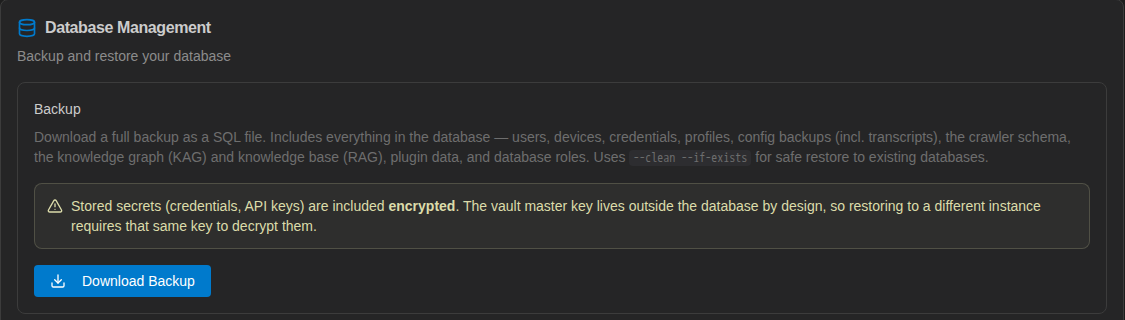
The file is a plain SQL dump of the whole database — users, devices, profiles and their secrets (still encrypted), config backups, the discovery (crawler) schema, the knowledge base, plugin data and database roles. It uses --clean --if-exists so it can be restored over an existing database. Each backup is recorded in the audit log as system.backup.
The Controller doesn't schedule database backups itself (apart from the dump upgrade.sh takes before an upgrade). For regular backups, run pg_dump against the database from cron or your backup tool.
Restore a Backup
- Open Administration → Deployment Info.
- Under Restore, choose a
.sqlfile previously downloaded with Download Backup. - Click Restore and confirm in the Confirm Database Restore dialog. This overwrites all current data.

Restores are recorded in the audit log as system.restore.
Stored secrets are encrypted with the VAULT_MASTER_KEY from .env. To restore onto a new host, configure it with the same vault master key before restoring, or the restored credentials cannot be decrypted.
What a Complete Backup Needs
| Item | Where | In the database backup? |
|---|---|---|
| Database | pgdata volume or your external PostgreSQL | Yes |
.env (including VAULT_MASTER_KEY) | deploy/.env | No — back it up separately and securely |
| Internal TLS CA, certificates, plugin storage | netstacks_data volume | No — back up the volume if you want to keep the same CA |
Compose files and crawler/deployment.yml | deploy/ | No — keep the release package or a copy of any edits |